

How to A/B Test Popups in WordPress
What to test first, how much traffic you need, how long to wait and how to read the result.
 Wahiduz Zaman
Oct 26, 2026
4 min read
Pro
A fair popup A/B test changes one thing, splits visitors evenly, waits for several hundred views per version and runs for whole weeks. In WordPress with Wing Popup Pro:
- Switch on analytics.
- Duplicate the popup and change one element in the copy.
- Create an A/B test under Settings → A/B Tests with both popups.
- Read the verdict in Analytics, keep the winner, test the next idea.
Opinions about popups are cheap: “the green button will win”, “people hate images”, “nobody reads the subheading”. A/B testing replaces them with your own visitors’ behaviour. It is also easy to get wrong in ways that produce confident, meaningless results, so the rules for a trustworthy result get as much space below as the setup.
What to test first
Test the things with the biggest effect first. Roughly in order:
- The offer: 10% off versus free shipping; a checklist versus a newsletter.
- The headline: the benefit in different words.
- The timing: 8 seconds versus 50% scroll.
- The format: a centred popup versus a slide-in.
- The button text: “Get my code” versus “Subscribe”.
- The image: product versus people versus none.
Colour and font tweaks come last. They rarely move the result enough to measure on a small site.
Step 1: Switch on analytics
A test without measurement has no result. Go to Wing Popup → Settings → Analytics, switch on Enable Analytics and choose What Counts as a Conversion: a form submitted, the call-to-action clicked, or either. Everything is recorded on your own site.
Step 2: Create the variant
- Go to Wing Popup → Popups and click Duplicate on the popup you want to test.
- Rename the copy so you can tell them apart, for example “Welcome offer (B)”.
- Change one thing in the copy.
- Switch both popups on, with the same triggers, pages and frequency rules.
Step 3: Create the test
- Go to Wing Popup → Settings → A/B Tests and click Add New A/B Test.
- Name it, switch it on, and add both popups under Popups in This Test.
- Leave Traffic Split empty for an even split (or enter
80,20to give a risky new idea less traffic). - Keep Minimum Views Per Popup at 100 or raise it.
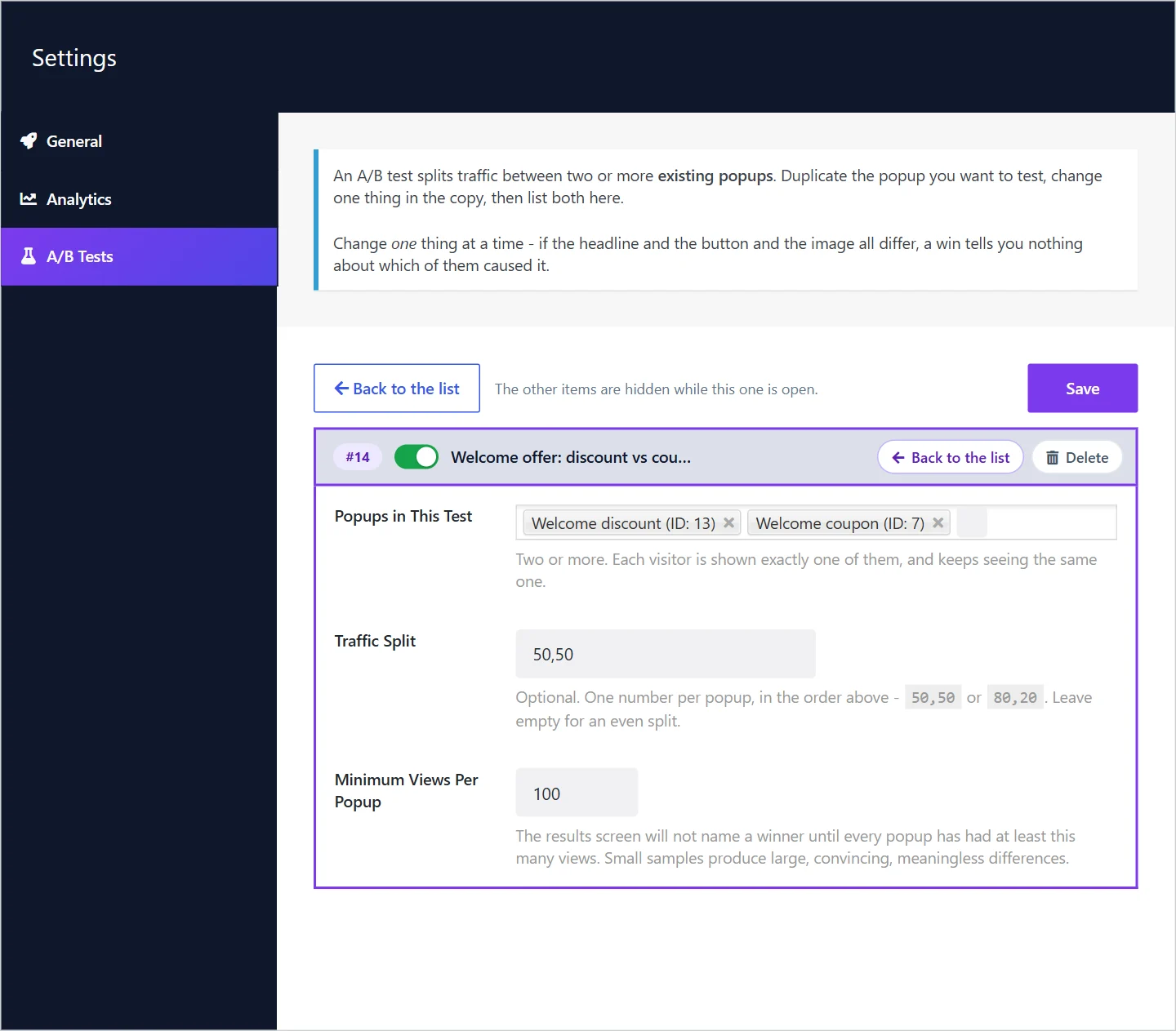
Each visitor’s version is decided in their own browser and remembered, so they see the same popup on every page and visit. We designed it that way for cached sites: if the server picked the version, a page cache would freeze one visitor’s pick and serve it to everyone, and the test would quietly stop splitting. Nothing about the assignment is stored on your server.
Step 4: Read the result
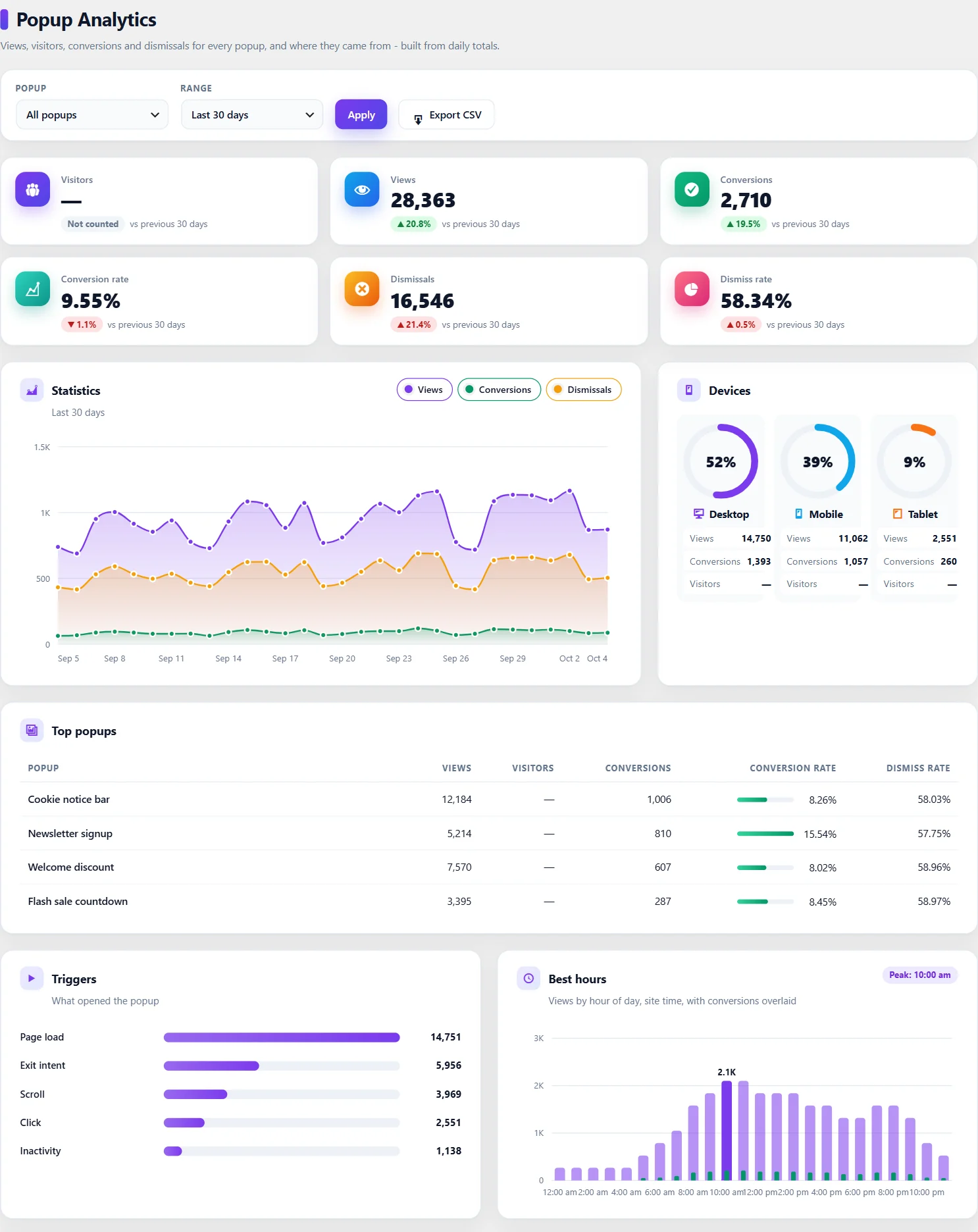
Open Wing Popup → Analytics. The A/B tests card shows each popup’s views, conversions and conversion rate, with a verdict:
- Too early to call: not every popup has reached the minimum views.
- No clear winner yet: the likely ranges of the two rates still overlap; either could be better. Keep going.
- One popup is ahead: the ranges no longer overlap, so the difference is unlikely to be chance.
Rules for a result you can trust
- Change one thing. If the headline, image and button all differ, a win tells you nothing about which change caused it.
- Wait for enough views. Small samples produce large, convincing, meaningless differences. 100 views per popup is a floor; several hundred is better.
- Run whole weeks. Weekday and weekend visitors behave differently. Stop after one or two full weeks, not mid-week.
- Do not stop the moment one version leads. Early leads swap places all the time; peeking and stopping is the commonest way to pick the loser.
- Keep everything else equal. Same triggers, pages and frequency for every popup in the test, and each popup in one running test at a time.
How much traffic do you need?
It depends on how different the versions are. If version A converts at 2% and B at 4%, a few hundred views each can show it. If they are 2.0% and 2.3%, you would need many thousands of views to tell them apart, which a small site may never reach. That is why big ideas (a different offer) are worth testing first: they produce differences large enough to see.
After the test
- Switch the test off or delete it.
- Switch the losing popup off.
- Keep the winner running, and test your next idea against it.
Frequently asked questions
Is A/B testing included in the free plugin?
No. A/B tests and analytics are Wing Popup Pro features. Without them, compare one version per period (for example two weeks each) and count signups, knowing that seasons and traffic sources can skew the result.
Can I test more than two popups?
Yes. A test can hold two or more popups, each shown to its share of visitors. Each extra version needs its own views, so tests with many versions take longer.
What is a good conversion rate to aim for?
It depends on the popup type and the offer. Our guide to popup conversion rates gives published benchmarks.