

How Often Should a Popup Show? Frequency Rules That Respect Visitors
Cooldowns, session limits and "never again after signup": the settings that keep returning visitors happy.
 Wahiduz Zaman
Oct 17, 2026
4 min read
Free
Show an automatic popup to the same visitor once a day at most, and leave them alone for weeks after they close it. Good starting points:
- Newsletter signup: a cooldown of 1 day after showing, 30 days after dismissal.
- Sale announcement: once per session.
- Welcome offer: once ever.
- Button popups: every time the button is clicked.
What people hate is rarely the popup itself. It is seeing the same one on every page, every visit, after they already said no. Frequency rules fix that, and they are the setting most site owners never touch. Below is what each rule does, the values we suggest for common popups, and where to set them in the free Wing Popup plugin.
Why frequency matters more than design
A beautiful popup that comes back every page view still trains visitors to close it without reading. A plain popup that appears once, at a sensible moment, and then respects the answer, gets read. Frequency also protects the people you care about most: returning readers and customers, who see your site far more often than first-time visitors.
Two kinds of “no” deserve different treatment:
- They saw it and kept reading. Maybe they did not notice, maybe the timing was wrong. Asking again in a day or two is fair.
- They closed it. That is an answer. Ask again in weeks, not hours.
The four frequency modes
In Wing Popup the rules are on the popup’s Display Options tab, under Frequency & Suppression.
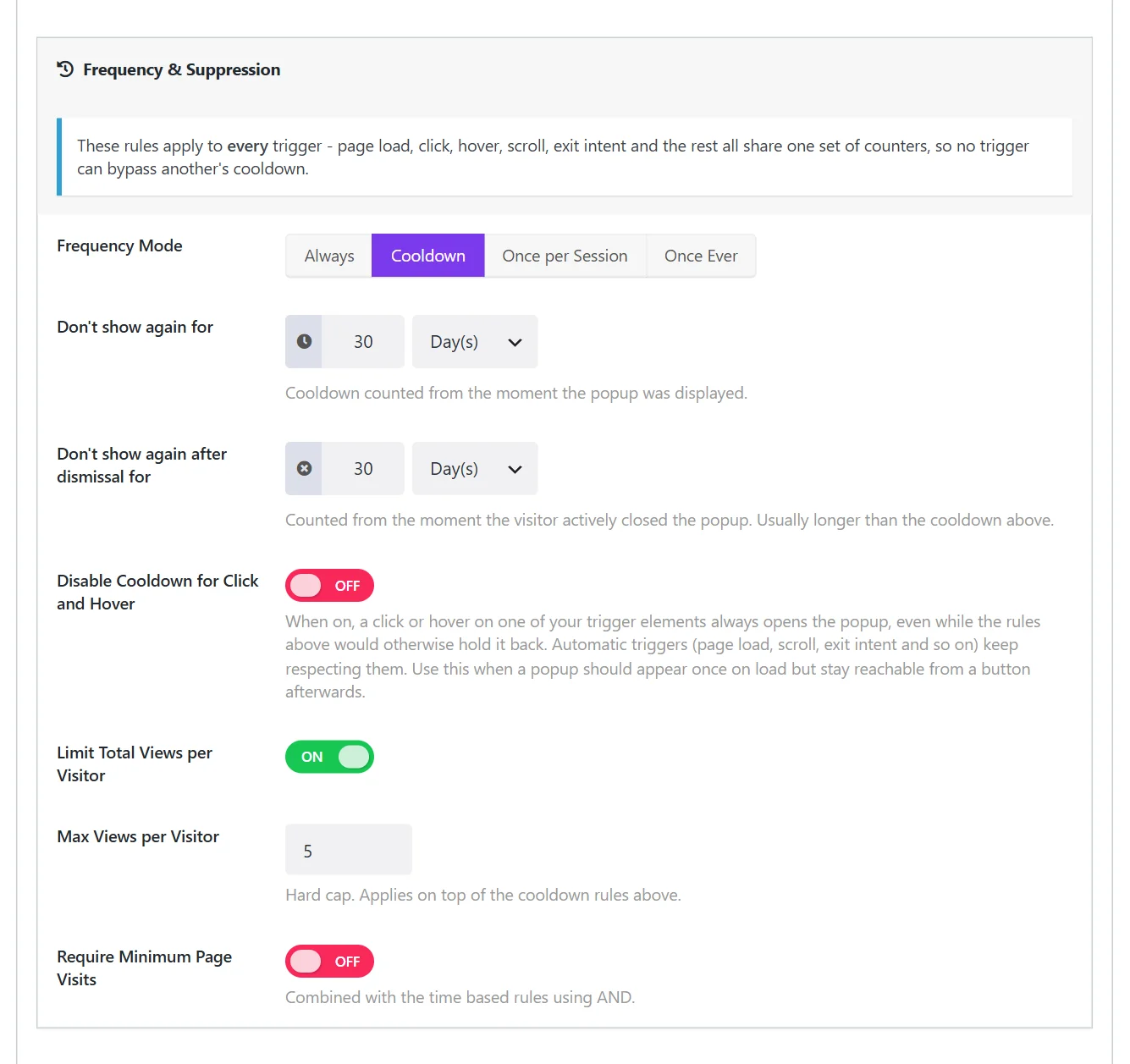
- Always: no limit. The popup opens whenever a trigger fires. Right for button popups and for notices that remember the answer themselves (cookie notices, age gates).
- Cooldown: after showing, the popup stays away for a time you set. The default, and the right choice for most automatic popups.
- Once per Session: once per visit. A new session starts when the visitor closes the browser and comes back.
- Once Ever: once per visitor, then never again in that browser.
The two cooldown timers
With Cooldown selected, two timers appear, each with a number and a unit (minutes to months):
- Don’t show again for: counted from the moment the popup was displayed. 3 hours by default.
- Don’t show again after dismissal for: counted from the moment the visitor actively closed the popup. 7 days by default.
The second timer should almost always be the longer one. Many sites set it to 30 days for signup popups.
Two extra limits
- Limit Total Views per Visitor: a hard cap. With Max Views per Visitor at 5, the same person sees the popup five times at most, however the cooldowns fall.
- Require Minimum Page Visits: holds the popup back until the visitor has viewed a number of pages (2 by default). It spares first-time visitors a popup on their very first page, which is often their least committed moment.
Settings for common popups
| Popup | Mode and timers | Why |
|---|---|---|
| Newsletter signup | Cooldown: 1 day, 30 days after dismissal | A second chance tomorrow, silence after a clear no |
| Sale or announcement | Once per Session | Seen once per visit while the sale runs |
| First-order discount | Once Ever, plus 2 page visits | Offered once, to people who looked around |
| Exit-intent offer | Cooldown: 3 days, 14 days after dismissal | Leaving is frequent; the offer should not be |
| Cookie notice, age gate | Always | These remember the visitor’s answer themselves |
| Popup opened by a button | Always | The visitor asked for it |
Keep buttons working
A popup that opens by itself once and is also reachable from a button (a size guide, a contact form) needs one more switch: Disable Cooldown for Click and Hover. With it on, a click always opens the popup, while automatic triggers keep respecting the cooldown. Without it, the button would seem broken during the cooldown. See popups on button click.
One set of counters for every trigger
In Wing Popup the frequency rules cover every trigger together: page load, click, and with Pro scroll, exit intent, inactivity and the rest. A popup shown by the scroll trigger is in its cooldown for the exit-intent trigger too.
It did not start that way. Early versions had a separate “show again after” setting on each trigger, and a popup with two triggers could appear twice in a row: once on page load, then again on exit. We replaced the per-trigger settings with this one set of rules, and moved everyone’s old values into it.
How visitors are remembered (and how to test)
The counters live in the visitor’s own browser storage. Nothing is stored on your server and no personal data is collected, which also means the rules work on cached pages. Two consequences:
- A visitor who clears their browser data, uses a private window or switches device counts as new.
- You are a visitor too. If your popup stops appearing while you test, its cooldown is doing its job. Test in a private window, or set the mode to Always until you are done.
Starting a new campaign
When you run a new offer, you usually want everyone to see it, including people who dismissed the old one. Duplicate the popup, change it, and switch the old one off: the copy has its own counters. (Changing a popup’s type also starts its counters afresh, because it is a different offer.)
Frequently asked questions
Are frequency rules part of the free plugin?
Yes. All four modes, both timers, the view limit and the page-visit minimum are free.
Can I stop showing a popup to people who already subscribed?
A successful signup closes the popup, and the cooldown then applies. For subscribers who come back on another device, Once Ever or a long cooldown is the simplest answer.
How often is too often?
If a returning visitor sees the same automatic popup more than once a day, it is too often. If they see it again within a week of closing it, it is too often.