


A/B testing Pro
Split traffic between two or more popups to find out which version converts better.
An A/B test shows different popups to different visitors and measures which one converts better. In Wing Popup a test is a list of existing popups: each visitor is shown exactly one of them, and keeps seeing the same one.
Before you start#
- Switch on Analytics. A test without analytics has no results.
- Decide the one thing you want to test: the headline, the image, the offer, the button text, the trigger.
1. Create the variant#
- Go to Wing Popup → Popups.
- Click Duplicate on the popup you want to test.
- Rename the copy so you can tell them apart, for example Welcome offer (B).
- Edit the copy and change the one thing you are testing.
- Switch both popups on, with the same triggers and display rules.
2. Create the test#
- Go to Wing Popup → Settings → A/B Tests.
- Click Add New A/B Test.
- Fill in the fields and click Save.
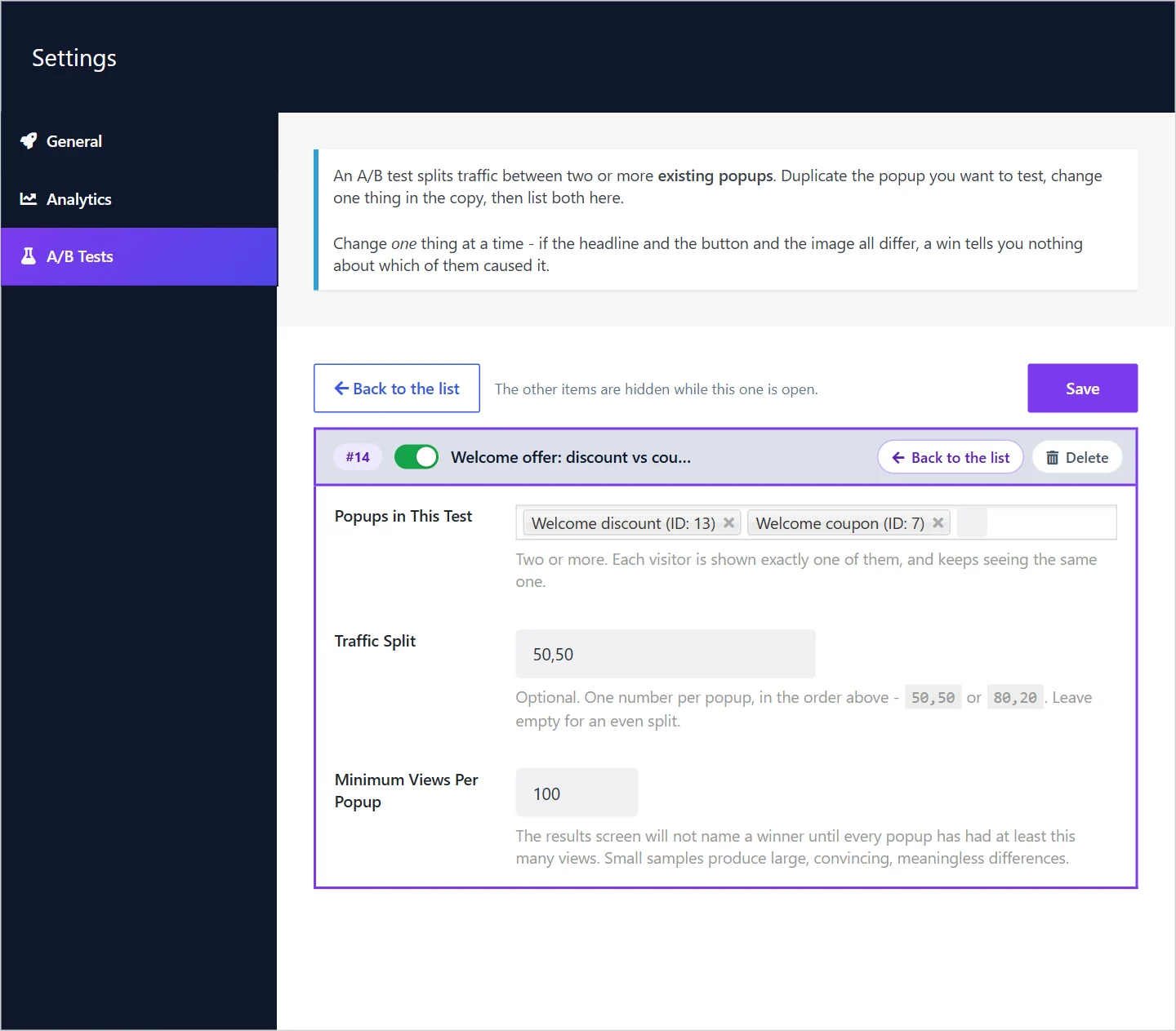
| Field | What it does |
|---|---|
| Test Name | A name for you, shown in the reports. |
| Running (the switch) | While off, every listed popup behaves normally and no traffic is split. |
| Popups in This Test | Two or more popups. Each visitor is shown exactly one. |
| Traffic Split | Optional. One number per popup, in the order above: 50,50 or 80,20. Leave empty for an even split. |
| Minimum Views Per Popup | The results do not name a winner until every popup has had at least this many views. 100 by default. |
3. Read the results#
Open Wing Popup → Analytics. The A/B tests card lists each running test with every popup's views, conversions and conversion rate, and gives a verdict:
| Verdict | Meaning |
|---|---|
| Too early to call | Not every popup has reached the minimum views yet. |
| No clear winner yet | The likely ranges of the conversion rates still overlap: the data fits either popup being the better one. Keep the test running. |
| One popup is ahead | The ranges no longer overlap. The difference is unlikely to be chance. |
4. Finish the test#
When you have a winner:
- Switch the test off, or delete it.
- Switch the losing popup off.
- Keep the winner running. Then test the next idea against it.
Rules for a test you can trust#
- Change one thing. If the headline, the button and the image all differ, a win tells you nothing about which of them caused it.
- Wait for enough views. Small samples produce large, convincing, meaningless differences. The minimum of 100 views per popup is a floor, not a goal; several hundred is better.
- Run full weeks. Weekday and weekend visitors behave differently. Stop a test after whole weeks, not in the middle of one.
- Do not peek and stop early. Ending a test the moment one version is ahead is the commonest way to pick the wrong one.
- Keep everything else equal. Same triggers, same pages, same frequency rules for every popup in the test.
How visitors are assigned#
A visitor's version is decided in their own browser and remembered there, so they see the same popup on every page and visit. Nothing about the assignment is stored on your server, and tests work on cached pages.
Put a popup in only one running test at a time, so its visitors are split by one rule.
Did this not answer your question?
Send us what you are trying to do and we will help, and improve this page.