


Frequency and suppression
Control how often one visitor sees a popup with cooldowns, once per session, once ever, view caps and minimum page visits.
Frequency rules decide how often the same visitor sees a popup. Without them a popup would open on every page view. They are on a popup's Display Options tab under Frequency & Suppression, and they are part of the free plugin.
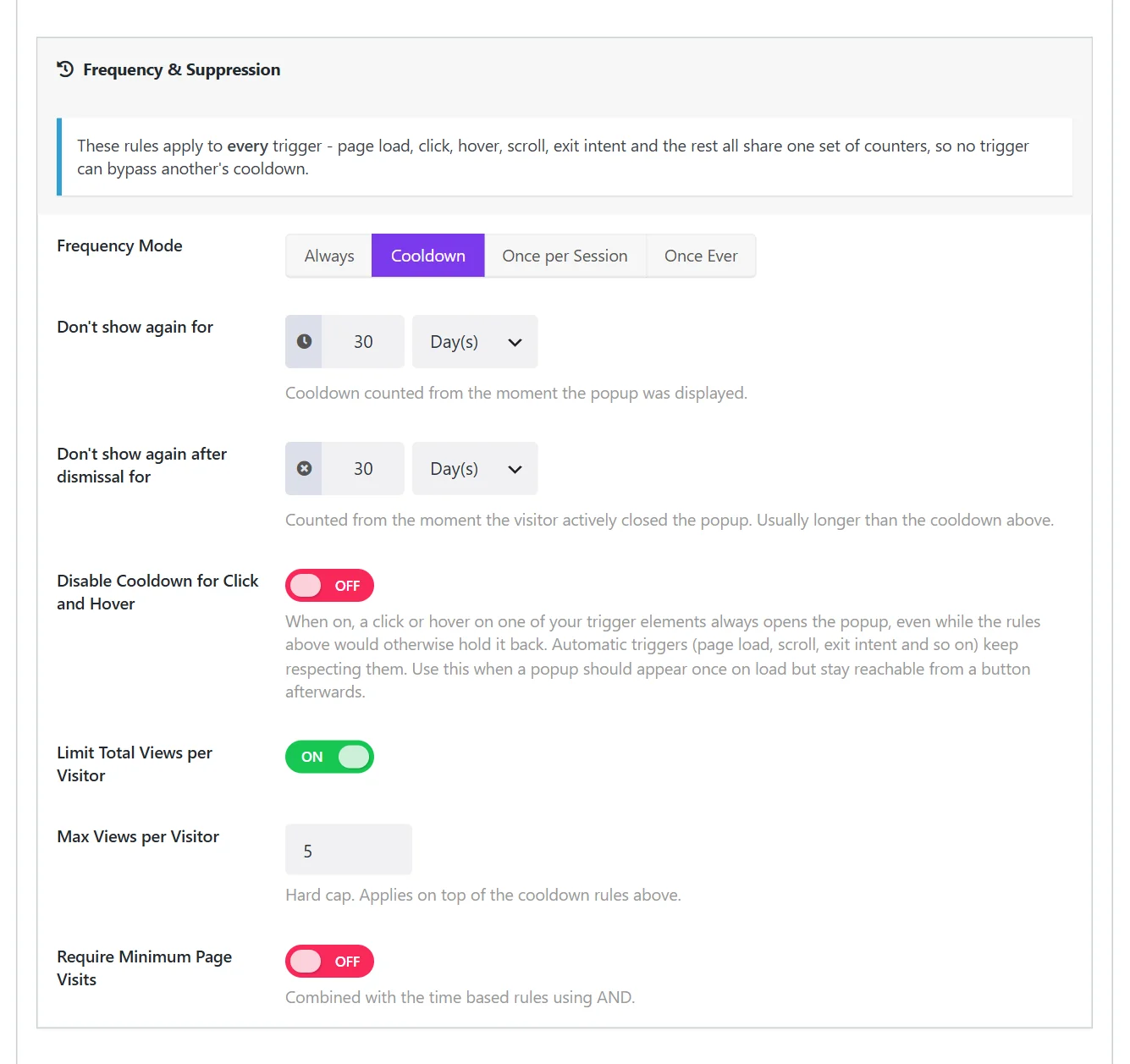
These rules apply to every trigger. Page load, click, scroll, exit intent and the rest share one set of counters, so one trigger cannot get around another's cooldown.
Frequency Mode#
| Mode | Result |
|---|---|
| Always | No limit. The popup opens whenever a trigger fires. |
| Cooldown | After the popup was shown, it stays away for a time you set. The default. |
| Once per Session | Once per browser session. A new session starts when the visitor closes the browser and comes back. |
| Once Ever | Once per visitor, then never again in that browser. |
Cooldown settings#
With Cooldown selected, two timers appear. Each takes a number and a unit: minutes, hours, days, weeks or months.
| Field | What it does |
|---|---|
| Don't show again for | Counted from the moment the popup was displayed. 3 hours by default. |
| Don't show again after dismissal for | Counted from the moment the visitor actively closed the popup. 7 days by default. |
The second timer is usually the longer one. Someone who closed your popup has given you an answer, and asking again an hour later is the quickest way to annoy them.
Disable Cooldown for Click and Hover#
When this is on, a click or hover on one of your trigger elements always opens the popup, even while the rules above would hold it back. Automatic triggers (page load, scroll, exit intent and so on) keep respecting them.
Switch it on when a popup should appear once by itself and still stay reachable from a button afterwards: a size guide, a contact form, a video.
Limit Total Views per Visitor#
A hard cap on top of the mode. With Max Views per Visitor set to 5, the popup is shown to the same visitor at most five times in total, however the cooldowns fall.
Require Minimum Page Visits#
Holds the popup back until the visitor has viewed a number of pages (Minimum Page Visits, 2 by default). It is combined with the time-based rules: both must allow the popup.
Use it to spare first-time visitors a popup on their very first page.
Suggested settings#
| Popup | Mode |
|---|---|
| Newsletter signup | Cooldown: 1 day after showing, 30 days after dismissal |
| Sale announcement | Once per Session |
| One-time welcome offer | Once Ever |
| Cookie notice, age gate | Always (the popup remembers the answer itself) |
| Popup opened only by a button | Always, or Cooldown with Disable Cooldown for Click and Hover |
How visitors are remembered#
The counters live in the visitor's own browser storage. Nothing is stored on your server and no personal data is collected. This has three consequences:
- The rules work on cached pages.
- A visitor who clears their browser data, uses a private window or switches device counts as new.
- While testing, you are a visitor too. If your popup stops appearing, its cooldown is doing its job. Test in a private window, or set the mode to Always until you are done.
Reset a popup for everyone#
Changing a popup's Popup Type starts its counters afresh for all visitors, because it is now a different offer. There is no other reset; to run a new campaign, duplicate the popup and switch the old one off. The copy has its own counters.
Did this not answer your question?
Send us what you are trying to do and we will help, and improve this page.